Site.pro Site.pro
  • AI Website BuilderAI Website Builder
    • AI Website BuilderAI Website Builder
    • Online StoresOnline Stores
    • PricesPrices
    • CollaborationCollaboration
    • Website ImportWebsite Import
    • PluginsPlugins
    • Website BuilderWebsite Builder
    • TemplatesTemplates
    • For Design StudiosFor Design Studios
    • Useful LinksUseful Links
    • Affiliate ProgramAffiliate Program
    • We Build for YouWe Build for You
    • ExamplesExamples
    • LanguagesLanguages
  • DomainsDomains
    • Register Domain NameRegister Domain Name
    • Migrate DomainsMigrate Domains
    • For Domain InvestorsFor Domain Investors
    • Domain ZonesDomain Zones
    • DomainityDomainity
    • FAQ: DomainsFAQ: Domains
    • Popular Domain ZonesPopular Domain Zones
    • .com.com
    • .org.org
    • .net.net
    • .us.us
    • .co.co
  • EmailEmail
    • Free EmailFree Email
    • Email for BusinessEmail for Business
    • PricesPrices
    • Transfer EmailsTransfer Emails
    • Custom Domain EmailCustom Domain Email
    • FAQ: EmailFAQ: Email
    • Popular FAQsPopular FAQs
    • Email SetupEmail Setup
    • Auto ReplyAuto Reply
    • Auto ForwardingAuto Forwarding
    • Spam ProtectionSpam Protection
  • Accounting SoftwareAccounting Software
    • Accounting SoftwareAccounting Software
    • ModulesModules
    • PricesPrices
    • Integrations, APIIntegrations, API
    • Accounting Companies (389)Accounting Companies (389)
    • Software Integrators (52)Software Integrators (52)
    • Affiliate PartnersAffiliate Partners
    • Useful LinksUseful Links
    • Business TypesBusiness Types
    • Use CasesUse Cases
    • Accounting CompaniesAccounting Companies
    • Sole ProprietorSole Proprietor
    • InvoicingInvoicing
    • FarmerFarmer
    • E-commerceE-commerce
  • For ResellersFor Resellers
    • White LabelWhite Label
    • Revenue ShareRevenue Share
    • PricesPrices
    • PanelsPanels
    • How it WorksHow it Works
    • Marketing MaterialsMarketing Materials
    • Mass ImportMass Import
    • Our PartnersOur Partners
    • Reselling ExamplesReselling Examples
    • DocumentationDocumentation
    • Free WebsitesFree Websites
  • LearnLearn
    • Knowledge BaseKnowledge Base
    • BlogBlog
    • Growth HackingGrowth Hacking
    • For HostingsFor Hostings
    • For EducationFor Education
    • Website Сreation TutorialWebsite Сreation Tutorial
    • Teaching Institutions (69)Teaching Institutions (69)
    • Accounting Courses WorldwideAccounting Courses Worldwide
  • AI Website BuilderAI Website Builder
    • AI Website BuilderAI Website BuilderAI creates websites for you
    • Online StoresOnline StoresBuild online stores
    • PricesPricesAdvanced Features
    • CollaborationCollaborationCo-create websites live
    • Website ImportWebsite ImportImport Any Website
    • PluginsPluginsBuilder plugin and functions
    • Website BuilderWebsite BuilderKey Features
    • TemplatesTemplates200+ Awesome Templates
    • For Design StudiosFor Design StudiosBenefits for Design Studios
    • Useful LinksUseful Links
    • Affiliate ProgramAffiliate Program
    • We Build for YouWe Build for You
    • ExamplesExamples
    • LanguagesLanguages
  • DomainsDomains
    • Register Domain NameRegister Domain NameDomain registration, parking, transfer
    • Migrate DomainsMigrate DomainsTransfer. Connect. Renew
    • For Domain InvestorsFor Domain InvestorsDiscount on all domains
    • Domain ZonesDomain ZonesBuy New Domain Name
    • DomainityDomainityDomain usage by country
    • FAQ: DomainsFAQ: DomainsFind Answer
    • Popular Domain ZonesPopular Domain Zones
    • .com.com
    • .org.org
    • .net.net
    • .us.us
    • .co.co
  • EmailEmail
    • Free EmailFree EmailCreate email
    • Email for BusinessEmail for BusinessAdvanced features & protection
    • PricesPricesCheap email hosting
    • Transfer EmailsTransfer EmailsMigrate your mailboxes
    • Custom Domain EmailCustom Domain EmailEmail address with your domain
    • FAQ: EmailFAQ: EmailFind Answer
    • Popular FAQsPopular FAQs
    • Email SetupEmail Setup
    • Auto ReplyAuto Reply
    • Auto ForwardingAuto Forwarding
    • Spam ProtectionSpam Protection
  • Accounting SoftwareAccounting Software
    • Accounting SoftwareAccounting SoftwareCloud based ERP
    • ModulesModulesMain accounting software modules
    • PricesPrices30 days free trial
    • Integrations, APIIntegrations, APIIntegration with external systems
    • Accounting Companies (389)Accounting Companies (389)Choose your partner for accounting
    • Software Integrators (52)Software Integrators (52)Pick your integrations partner
    • Affiliate PartnersAffiliate PartnersPartners and Affiliate program
    • Useful LinksUseful LinksCalculators and Calendars
    • Business TypesBusiness TypesUse Cases
    • Use CasesUse Cases
    • Accounting CompaniesAccounting Companies
    • Sole ProprietorSole Proprietor
    • InvoicingInvoicing
    • FarmerFarmer
    • E-commerceE-commerce
  • For ResellersWhite LabelFor ResellersWhite Label
    • White LabelWhite LabelCustomise Builder
    • Revenue ShareRevenue ShareEarn 50% from each upgrade
    • PricesPricesRevenue Share. White Label
    • PanelsPanelsOne product for all platforms
    • How it WorksHow it WorksCloud or On-Premises
    • Marketing MaterialsMarketing MaterialsVideo. Mockups. Blocks
    • Mass ImportMass Import
    • Our PartnersOur Partners
    • Reselling ExamplesReselling Examples
    • DocumentationDocumentation
    • Free WebsitesFree Websites
  • LearnLearn
    • Knowledge BaseKnowledge BaseFAQ, Tutorial, Video
    • BlogBlogSite.pro Blog
    • Growth HackingGrowth HackingBoost your sales
    • For HostingsFor HostingsTips on marketing
    • For EducationFor EducationTraining. Tutorials
    • Website Сreation TutorialWebsite Сreation Tutorial
    • Teaching Institutions (69)Teaching Institutions (69)
    • Accounting Courses WorldwideAccounting Courses Worldwide
  • RegisterRegister
    Site.pro

    Create Your Account

    Get started — free and easy!

    Register

    By proceeding, you accept our Terms of Service and Privacy Policy
  • Log inLog in
    Site.pro

    Welcome back!

    Access your work space

    Log in

    New user? Create account
    Forgot password?
  • $
    $
  • EnglishEnglish
  • Hosting Tips (75)
  • Shared Hosting (20)
  • Web Design (19)
  • Marketing (8)
  • Education (8)
  • eCommerce (7)
  • Cloud Accounting (2)

Table of Contents:

Category
Search

Table of Contents:

Website Building for Beginners: CMS or Website Builder?

Website Building for Beginners: CMS or Website Builder?

Right now even a beginner can launch a website in an evening — services promise “start in 15 minutes” and “no coding required.” But once they dive in, confusion appears: unfamiliar terms like CMS vs website builder, hosting, domain, templates, plugins, SEO.

As a result, many people either postpone the launch or choose a solution that starts limiting business growth after a few months.

This article will help you understand:

  • How a CMS differs from a website builder;
  • Which option is better for a beginner;
  • What mistakes people most often make at the start;
  • How hosting affects the website;
  • What role artificial intelligence plays in website creation.

Why the Choice of Platform Matters

For a beginner, choosing a platform for building a website often looks like a purely technical decision: “I’ll just pick something popular — there’s almost no difference.” But in reality, this choice determines the fate of the website for months or even years ahead.

The platform defines your possibilities and limitations, launch speed, stress level during work, cost of maintenance, and ease of scaling. An experienced developer can migrate a website, rewrite functionality, or optimise the system without problems. For a beginner, this becomes a challenge. For an inexperienced user, choosing the wrong platform often leads to a complete website rebuild and loss of motivation.

Let’s take a closer look at why choosing the right platform is so important for beginners.

Launching the website

The platform affects whether the website will be launched at all. One of the most common situations among beginners is that the site never gets published. It usually happens like this:

  1. The user picks a complicated CMS;
  2. Installs a theme;
  3. Runs into settings, errors, and plugins;
  4. Breaks the site several times;
  5. Puts the project aside “for later.”

In the end, the idea exists, the domain is bought — but there is no website. The right platform significantly reduces this risk because it gives a sense of quick progress: you see results on day one.

Project growth

The platform shapes your working style. Building a site on a CMS requires planning and technical discipline, while a website builder encourages experimentation, quick edits, and idea testing.

This is critical for beginners. If the platform feels too complicated, users become afraid to update or change the site, and development stops. A simple and friendly platform creates the feeling “I can manage this myself” — and that directly affects long‑term website quality.

When the project grows, you need to add pages, change the site structure, connect analytics, and improve SEO. If the platform is chosen without these needs in mind, the site starts slowing down the business instead of helping it. So it’s important to think not only about current needs, but also about room for growth.

Cost

Choosing the wrong platform leads to unexpected expenses. At first, a CMS may seem cheaper: hosting is inexpensive, and the system itself is free. But hosting does NOT include:

  • Paid themes and plugins;
  • A specialist’s salary;
  • Time spent solving technical issues;

As a result, a website that was “supposed to be free” ends up costing more than a simple builder with built‑in features and support.

What is a CMS

A CMS (Content Management System) is software installed on hosting that allows you to manage a website via an admin panel. The most well‑known examples: WordPress, Joomla, Drupal.

CMSs are often called a universal solution for building websites. This is partly true — almost half of the internet runs on WordPress. But for beginners, a CMS can be both a powerful growth tool and a constant source of problems.

Let’s look at the pros and cons.

Advantages of a CMS

Full control over the website. One of the main reasons to choose a CMS is the feeling of complete freedom. You can:

  • Change website structure;
  • Edit code;
  • Connect external services;
  • Create unique functionality.

This is important if your website is a key business component requiring non‑standard solutions. But, as Uncle Ben said, with great power comes great responsibility. On one hand, your site isn’t tied to a specific platform — you choose the hosting provider, can change it, and migrate your site freely. Plus, WordPress has plugins for SEO, security, forms, e‑commerce, and analytics.

Disadvantages of a CMS

On the other hand, the freedom of a CMS comes with a high learning curve. A beginner needs to understand hosting, databases, security, theme configuration, and technical errors. When using a CMS, YOU are responsible for security, updates, plugin maintenance, backups, and protection from DDoS and hacking.

A CMS looks cheap only at first glance. Real costs often include paid themes, plugins, performance optimisation, and developer support. Without technical knowledge, you’ll have to hire a freelancer or spend your own time solving issues. This slows down the launch — losing competitive advantage.

A CMS makes sense if you’re willing to learn and invest time and money into website maintenance. For a first website or fast launch, a website builder is usually a better choice.

What is a Website Builder

A Website builder is an online platform where a site is assembled from ready‑made blocks directly in the browser. Everything needed for building and managing a website — hosting, design, technical setup — is included.

Advantages of website builders

The main advantage is accessibility. You don’t need to understand hosting, databases, or coding. You open the editor and immediately see templates and ready‑made blocks.

Website builders are the ideal choice for first‑time users who want quick results. You can build a site in 1–3 hours, publish it the same day, and show it to clients immediately.

Most good builders include everything for a fixed rate:

  • Hosting;
  • Editor;
  • Support.

E-commerce in the Site.pro builderE‑commerce in the Site.pro builder

Another major advantage is adaptive design. Builders offer professional templates with ready‑made page structures and automatic mobile responsiveness. You don’t need to think about layout or button placement.

Builders also remove most technical burdens — security is handled by the platform, and updates are simple and automatic.

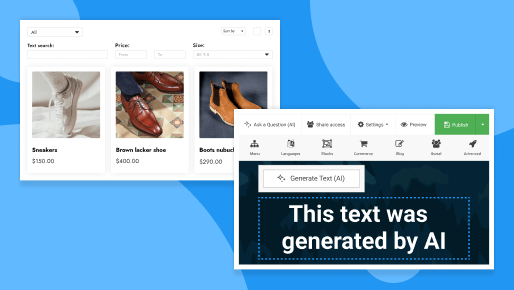
The AI assistant in the Site.pro builder makes the process even easier. It creates designs based on your project description and can modify the site on command: generate text, rearrange blocks, change styles, add languages, and more. Beginners don’t need to understand settings — just describe what you want.

Text generation with AIText generation with AI

Disadvantages of website builders

The main downside is platform limitations. Builders don’t allow deep customization, complex logic, or advanced integrations. For simple projects this is fine, but for non‑standard tasks limitations can become critical.

Another issue is platform dependency. The site is tied to the service and its pricing. Migration can be difficult or impossible.

Builders are also not ideal for complex technical projects requiring custom logic or advanced SEO. Only basic SEO settings are usually available.

Long‑term, a builder may become more expensive: while cheap at the start, subscription costs can grow as your needs increase.

Comparing CMS vs Website Builders

For convenience, here is a comparison table:

Criterion CMS Website Builder
Entry barrier Medium or high Very low. Suitable for users without technical skills
Launch speed 1–2 days to several weeks From 1 hour to 1 day
Control Full access to code and server settings Limited by platform rules
Flexibility Almost unlimited — any logic can be implemented Limited to built‑in tools
Mobile adaptation Depends on theme and settings Usually automatic
SEO Maximum, including technical SEO Basic, enough for small business
Security Completely on the user Mainly on the service
Cost Low but requires extra budgeting Transparent but may increase due to subscription
Website transfer Relatively easy Often difficult or impossible

Hosting Services and Website Creation

Beginners underestimate hosting, but it directly affects speed, stability, and security. Even the best CMS won’t work properly without reliable hosting.

You need hosting with:

  • Stable servers;
  • Fast, adequate support;
  • A simple control panel.

Some hosting providers are especially beginner‑friendly — for example, HOSTiQ. They offer an easy control panel and human‑centered 24/7 support. They support both popular CMSs and Site.pro builder websites, and also help transfer sites for free and select a plan for your case.

Max Mukhin
Our main approach is support and care in everything
Max Mukhin
Head of Product, Ukraine
Hostiq.ua

For beginners, this means fewer technical issues and more confidence. Less stress, fewer mistakes, more focus on content and business. If you choose a CMS, HOSTiQ also offers ready‑made packages with pre‑installed engines — you can start building right away.

A few years ago we recorded an episode of Shared Hosting Tips with our founder Filip and Max from HOSTiQ. They discussed digital trends, hosting, and marketing tricks.

Conclusion: What’s Better for You?

For small projects, experiments, personal websites, and quick results — choose a website builder.

For large projects that require full code freedom — choose a CMS, especially if you’re ready to learn or hire a specialist.

Building a Successful eCommerce Website that will Meet Customer Expectations
AI Website Builders in 2026: Features, Benefits, and What’s Still Missing
© Site.pro 2011. Website Builder. United States.
Contact SalesContact SalesTerms of ServiceTerms of ServicePrivacy PolicyPrivacy PolicyCookie SettingsCookie Settings